Deleting a contact removes it from your Reply account. This article explains what changes when you delete contacts, how to get them back, and what stays in your reports.
You can delete contacts on the People page: select them, click More and select Delete. You can also delete a contact from its contact card. Reply asks you to confirm. After that, there's no undo button.
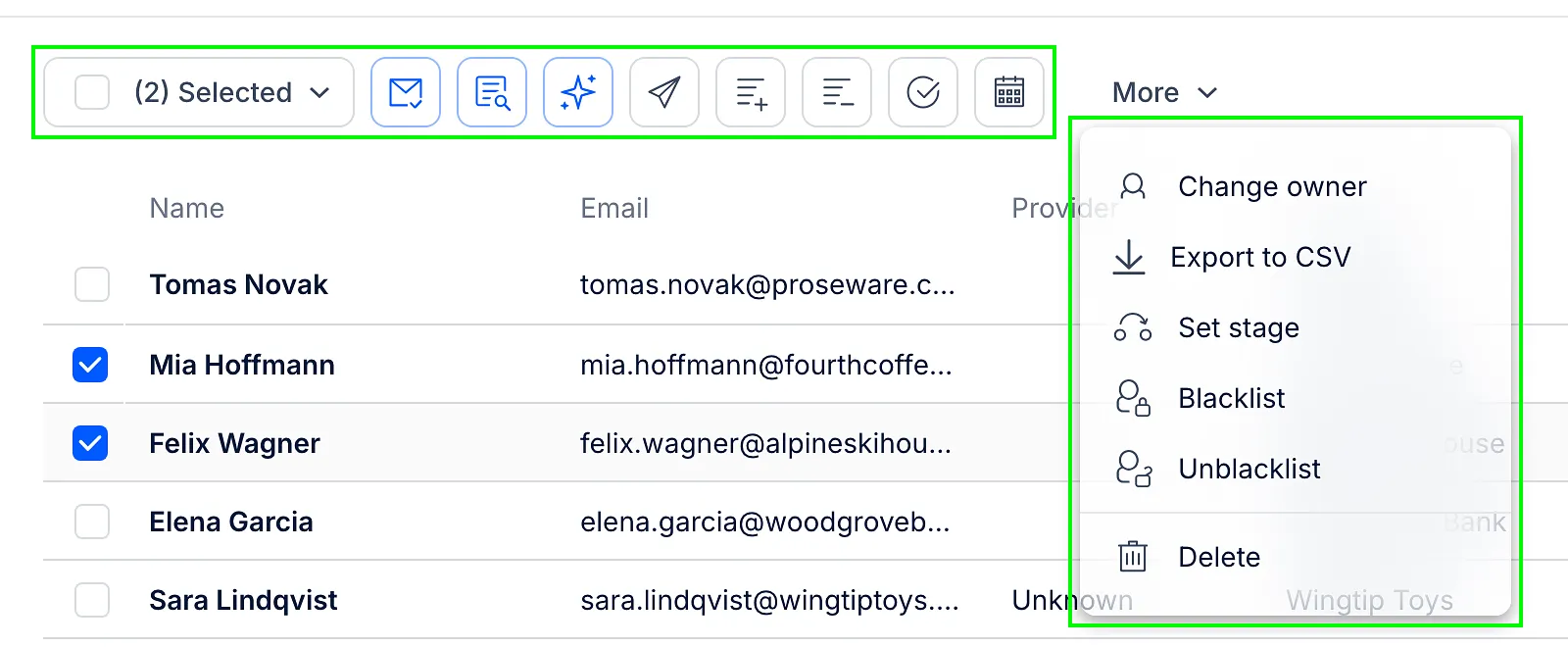
To delete contacts, your role needs the permission to delete contacts in Roles & Permissions. If the permission covers only your own contacts, you can't delete contacts owned by your teammates.
What happens when you delete a contact
-
The contact is removed from all its sequences and lists, and its planned emails are cancelled.
-
Its open tasks are closed.
-
Its Inbox conversations stay, but you can't reply in them. The conversation shows Contact has been deleted.
-
The contact isn't blacklisted. If you add it again later, Reply can contact it again.
-
The contact is no longer included when you export contacts from the People page.
💡 To stop emailing someone without losing their data, remove them from the sequence or blacklist them instead.
How to get deleted contacts back
Add the contacts again with the same email addresses. Reply finds the deleted contact and brings it back instead of creating a new one. You can:
-
import a CSV file with their email addresses;
-
add a contact manually with the same email address.
When a contact comes back:
-
its custom fields are empty, so include them in your CSV file if you need them;
-
it isn't in any sequence. Add it to a sequence again, or import the CSV file straight into a sequence.
💡 Deleted contacts don't appear anywhere in the app, but Reply keeps them. If you need a list of your deleted contacts, contact our support team and they can export it for you.
Do deleted contacts stay in reports?
Yes. Emails already sent to a deleted contact still count in Reports, together with their opens, clicks, replies and bounces. Only the Active and Paused numbers leave deleted contacts out, because they're no longer in the sequence.
Does deleting contacts free up my Active Contacts limit?
No. Contacts you've already reached out to in the current billing month still count toward your Active Contacts limit after you delete them. Learn more in our article on limits in Reply.
Read more about managing contacts: