There are a few cases when the opt-out link is not added at all, so let's review them first:
- Test emails - test emails sent from the Step editor.
- Direct emails - emails sent through the contact's card.
- All the fields in the Opt-out settings are blank/opt-out text is not put into the curly brackets.
While the first two options are expected, it is possible to fix the last one:
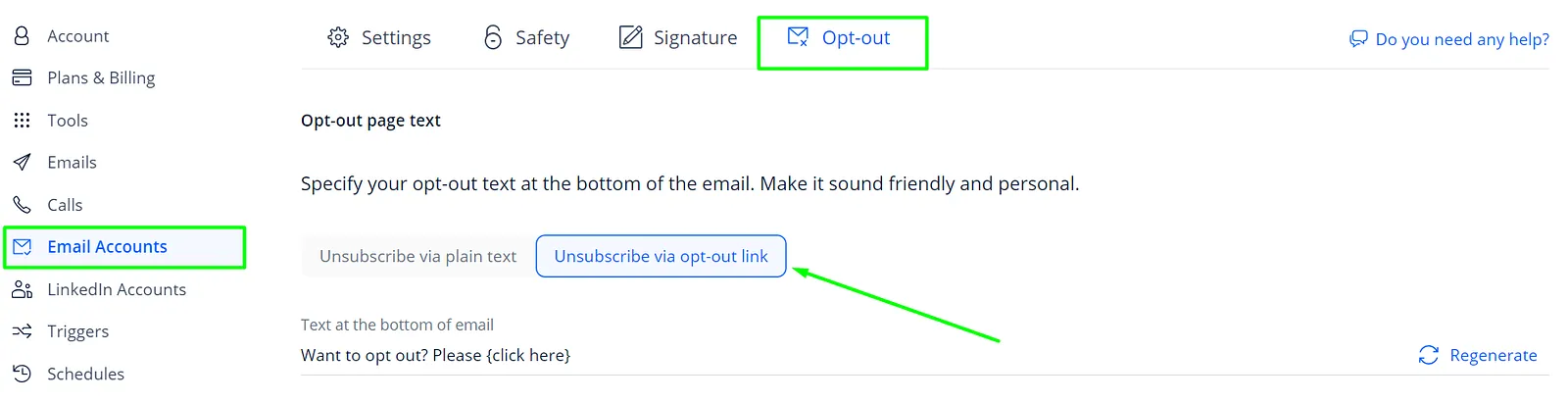
- Go to the Email Accounts tab of your Settings.
- Click on the needed mailbox and go to the Opt-out tab.
- Choose the Unsubscribe via opt-out link.
- Paste the text or click Regenerate to get another variant.
- Wrap the opt-out text into curly brackets {}. For example: Would you like to unsubscribe? Just {click this link} to opt out.
If you need more details about the opt-out options in Reply, please click here.