A bounced email is an email that was rejected by a mail server and thus is not delivered to the final recipient.
There are two types of bounced emails:
- Hard bounces: permanently rejected emails
- Soft bounces: temporary undeliverable emails
How to figure out why the email bounced
To understand why your emails bounced, you need to check the Delivery Status Notification message, also known as Non-Delivery Report or Non-Delivery Notification.
It’s an automatically generated report that contains information on why the delivery attempt was unsuccessful.
You can check your bounce reasons in several places:
- Your mailbox (review the bounce notifications directly).
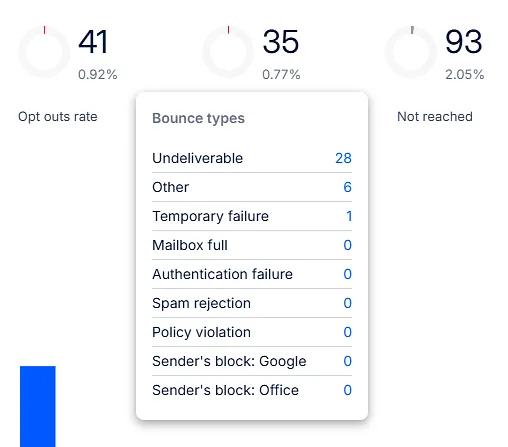
- Reports page → hover over the Bounced metric to see the detailed breakdown.
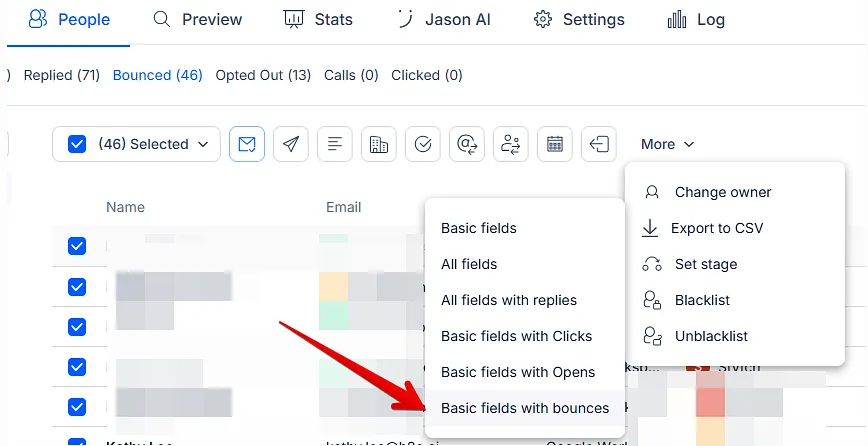
- People tab → export the full list of bounce reasons.
Bounce email structure
A bounce message typically contains:
- general information about the problem
- date and time of the incident
- mail server that rejected email
- error code that will help you understand the technical root of the problem
- link to additional information on how to troubleshoot the issue
Understanding the reasons of bounces
We’ve grouped the bounces into several conditional categories. Below, you’ll find a list of these categories along with some examples.
| Category | Example | Explanation | Action |
|---|---|---|---|
| Undeliverable | 550 5.1.1. User unknown, Mailbox not found, No such user, Recipient address rejected, Invalid recipient |
Invalid email / Mailbox disabled. The recipient’s email address does not exist or the mailbox has been deactivated and cannot receive messages. |
Validate your prospect list prior sending. |
| Mailbox full | 552 5.2.2 Mailbox size limit exceeded, User has exceeded quota, Disk full, Recipient's mailbox is full, |
The recipient’s mailbox has reached its storage limit and cannot accept new messages until space is freed up. |
Try later or remove prospects from your contact list. |
| Authentication failure | 550 5.7.1 DMARC policy, DMARC check failed, rejected by DMARC, missing SPF record, no SPF record found |
The receiving server could not verify the sender’s identity because one or more email authentication checks failed, so the message was rejected. |
Check your email authentication (SPF, DKIM, DMARC) |
| Spam rejection | 550 / 554 Spam detected, Blocked by spam filter, Message flagged as spam, High probability of spam |
The receiving server identified the message as suspicious or spam based on its filtering rules and refused to accept it. | Try changing your content, remove tracking or other links / images and try later |
| Policy violation | 554 / 550 5.7.1 Blocked by policy, Recipient policy, Administrative prohibition, Message rejected due to local policy |
The message was rejected because it violated the recipient server’s local or administrative policies (e.g., content restrictions, security rules, or recipient-specific settings). | Contact these prospects by other means |
| Temporary failure | 421 / 451 Connection timed out, No answer from host, Server busy |
The message could not be delivered due to a temporary issue on the recipient’s server (e.g., timeout, no response, server overload, or temporary system error) and may be retried later. | Try re-sending email later |
| Sender's block: Gsuite | 550 5.4.5 Daily sending quota exceeded You have reached a limit for sending mail. Your message was not sent. |
Can occur when you suddenly increased your sending volume or received a lot of spam complaints from Gsuite recipients | Pause sending for the next 24-48 h, start with low volumes and increase slowly |
| Sender's block: Office | Your message couldn't be delivered because you weren't recognized as a valid sender.... '550 5.7.708 Service unavailable. Access denied, traffic not accepted from this IP. For more information, please go to http://go.microsoft.com/fwlink/?LinkId=526653 AS(7230) Trial tenants: 550 5.7.232 - Your message can't be sent because your trial tenant has exceeded its daily limit for sending email to external recipients (tenant external recipient rate limit) Non-trial tenants: 550 5.7.233 - Your message can't be sent because your tenant exceeded its daily limit for sending email to external recipients (tenant external recipient rate limit) |
Your provider considered your activity as suspicious and blocked the sending process. Office has introduced new sending limits per tenant |
If you receive "..you were not recognized as a valid sender", navigate to How to Restore Your Office 365 Email Account After Suspension for a guideline If you receive "...Traffic not accepted from this IP...", pause your sending process for 1-2 days or contact MS support and share this bounce. In this case, you will still be able to send manual emails from your mailbox — the block applies only to third-party email automation. Please, refer to Introducing Exchange Online Tenant Outbound Email Limits article for details |
| Other | The bounces were not categorized into any category. |
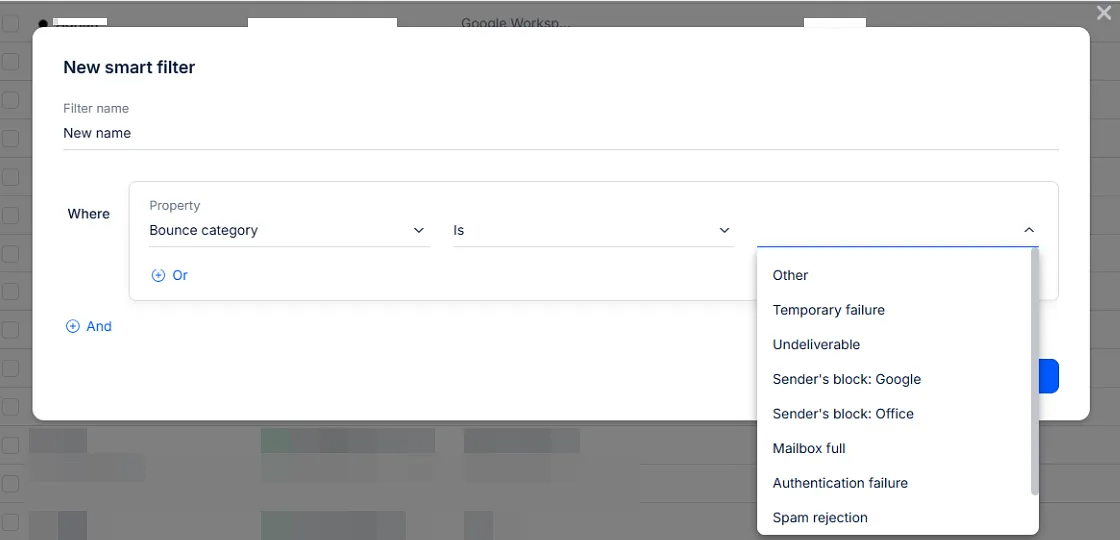
You can also find the specific bounce category at People tab by using a Smart filter:
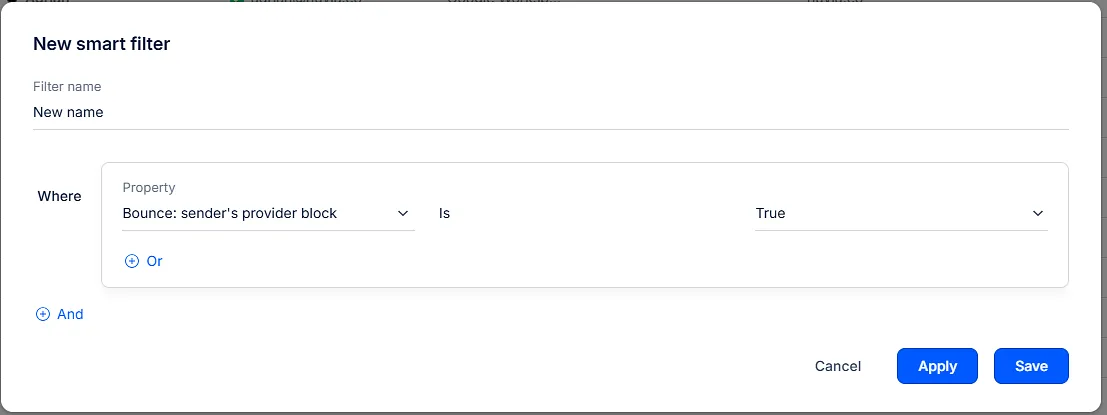
For provider's block you can also use this filter:
If you have any further questions, please feel free to contact our support team — we’ll be happy to assist you.