The inboxes calculator shows how many contacts your current email accounts can reach per month, and how many inboxes and domains you need to reach the number of people you plan to contact. You'll find it on the Email Accounts page.
The calculator only gives a recommendation. It doesn't change the sending limits of your email accounts.
Your current capacity
At the top of the Email Accounts page, a bar shows how far your current setup reaches, for example Your setup can reach up to 6,000 contacts per month. Below it, you see how many active inboxes are counted, how many emails per day they can send in total, and how many emails per contact your sequences have on average.

The number is worked out like this: the daily limits of your active inboxes added together, times 20 working days, divided by the average number of emails per contact.
What counts:
- only your own email accounts. Your teammates' accounts are not included;
- the daily limit set on each email account;
- the average number of email steps in your active sequences. If you have none, Reply uses 4.
Email accounts with connection errors, accounts blocked by their provider, and accounts on a domain with failed settings are left out. The bar then says how many were not counted, for example 2 inboxes with errors are not counted.
To hide the bar, click the X in its corner and confirm. ⚠️ Once hidden, the bar and the calculator can't be brought back on this page.
How to use the calculator
- Go to Settings → Email Accounts.
- Click How many inboxes do I need? in the capacity bar. If you have no email accounts yet, click Calculate my setup instead.
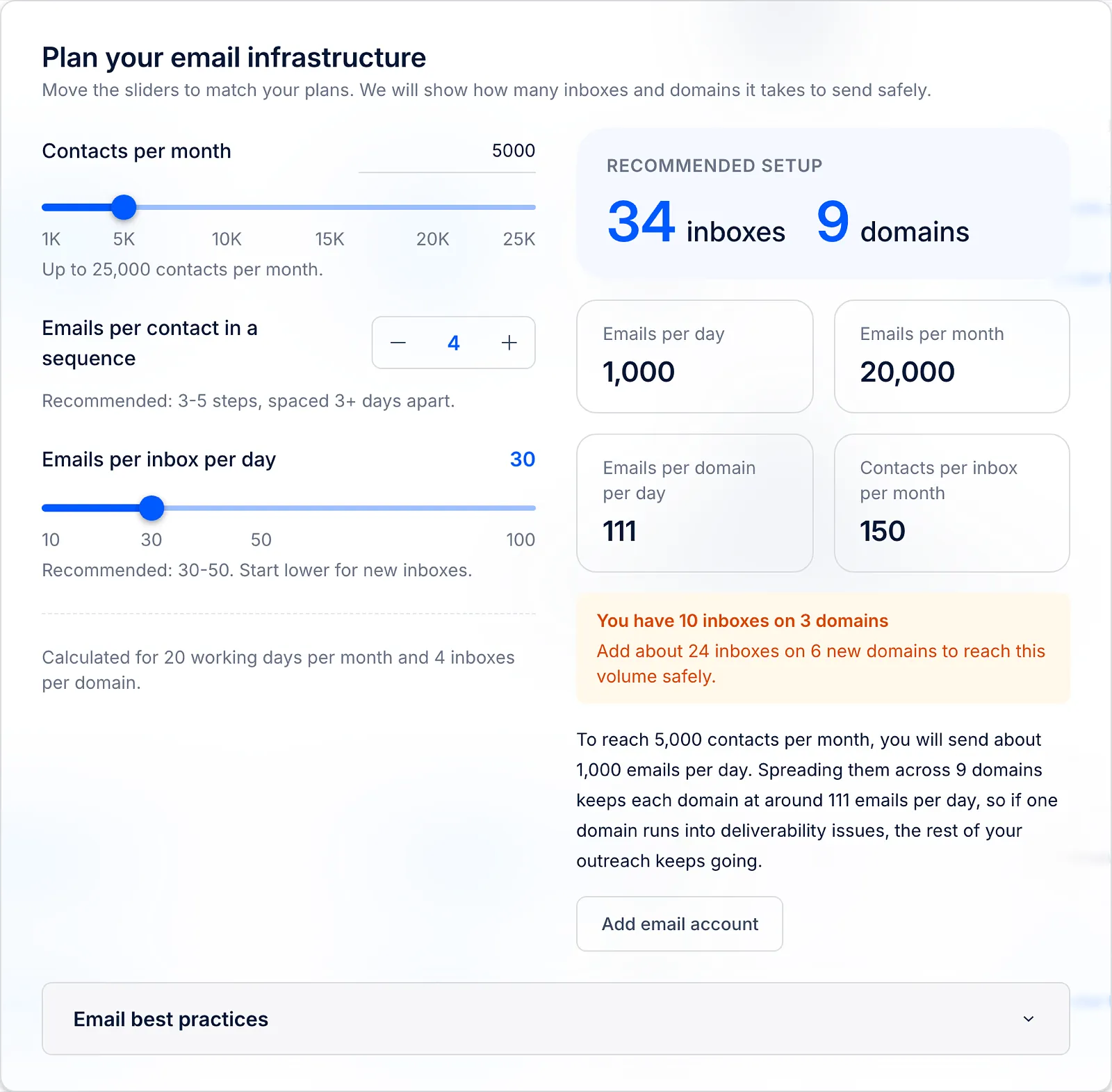
- In Plan your email infrastructure, set your plans:
- Contacts per month - how many people you want to reach each month (from 1,000). If your plan is based on a number of contacts, it starts at your plan's limit; otherwise at 5,000;
- Emails per contact in a sequence - from 1 to 10. It starts at the average of your active sequences;
- Emails per inbox per day - from 10 to 100. It starts at 30.
- Check the Recommended setup: how many inboxes and domains you need, with the emails per day, emails per month, emails per domain per day and contacts per inbox per month that go with it.
The calculator counts 20 working days per month and 4 inboxes per domain. Inboxes and domains are rounded up.
💡 Example: to reach 5,000 contacts with 4 emails each, you send 20,000 emails per month, which is 1,000 emails per day. At 30 emails per inbox per day, that takes 34 inboxes on 9 domains.
Compare it with what you have
Under the result, Reply compares the recommendation with your active inboxes:
- Your 40 inboxes already cover this volume. - you don't need more;
- You have 12 inboxes on 3 domains - followed by how many inboxes and new domains to add;
- Start with 34 inboxes on 9 domains. - shown when you don't have any email accounts yet.
If the recommendation is more than your plan includes, you'll also see how many more email accounts you need, for example Your plan includes 10 email accounts, so you will need 24 more.
From the calculator, you can go straight to:
- Purchase domains - to buy domains and mailboxes in Reply. It shows only if domain purchase is available in your account;
- Add email account (or Connect email account if you have none yet) - to connect an email account you already have.
Warnings and best practices
The calculator warns you when a number is risky:
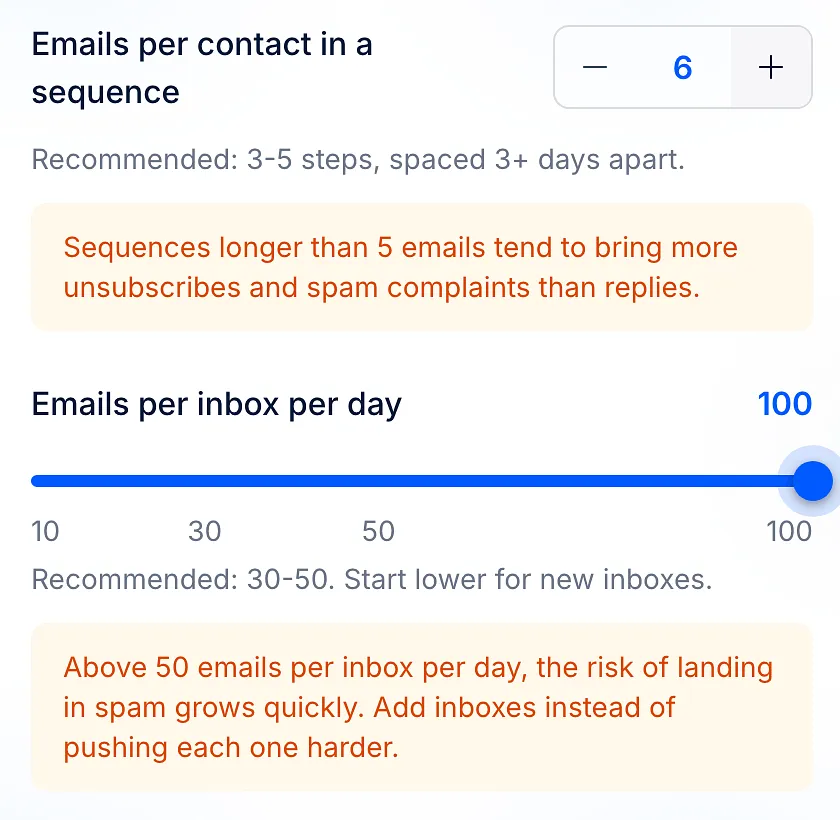
- more than 5 emails per contact: Sequences longer than 5 emails tend to bring more unsubscribes and spam complaints than replies.
- more than 50 emails per inbox per day: Above 50 emails per inbox per day, the risk of landing in spam grows quickly. Add inboxes instead of pushing each one harder.
Open Email best practices at the bottom of the calculator for tips on spare inboxes, warm-up, inboxes per domain and list quality.
Read more about email accounts: